
If on the Asus Rog Strix g733cx laptop the UCM-UCSI ACPI device in Device Manager shows the error:
Windows has stopped this device because it has reported problems. (Code 43)
UCSI PPM failed UCSI command. Please contact UCSI device or system manufacturer to investigate. (Command:GetConnectorCapability Status:0xc0000001)
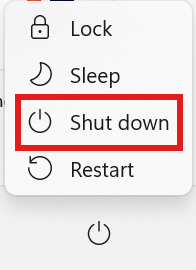
Shut down the computer
- Click the Windows icon at the bottom of the screen

- Press and hold the shift key on the keyboard and click the Shut down option
Drain the power from the computer circuits
- Unplug the power cable form the laptop
- Unplug all USB and monitor cables from the laptop
- Press and hold the power button for 60 seconds
Start the computer
- Plug the power cable into the laptop
- Press the power button
- You may need to reset your PIN. Make sure you can log into Windows with your Microsoft account using the email address you have registered at Microsoft.
