
Node.js has multiple unit testing frameworks, one of the most popular for web applications is Vitest. If a unit test fails, debugging is the best way to find the problem. To debug Vitest JavaScript and TypeScript unit tests in Visual Studio Code
Set the breakpoint
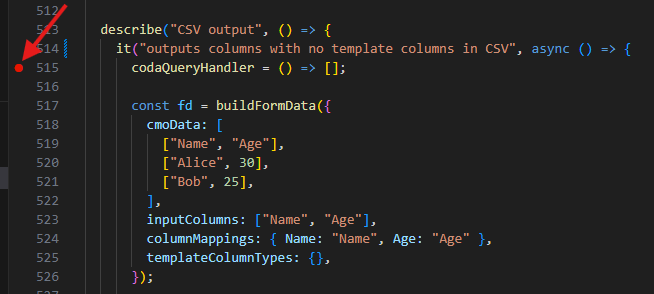
- In the unit test file set the breakpoint at the failing line by clicking the margin of the code
Open the JavaScript Debug Terminal
- Press CTRL-SHIFT-P (CMD-SHIFT-P on Mac) and on the top of the screen select JavaScript Debug Terminal
- In the dropdown on the top select the directory to open the terminal in
Start the debugger
- In the terminal window execute the command
cd PATH_TO_THE_APPLICATION && pnpm vitest run app/routes/THE_UNIT_TESTFILE_NAME.ts -t "THE_NAME_OF_THE_UNIT_TEST_IN_THE_it_STATEMENT"When the test reaches the breakpoint, the execution stops, and the variable values are available by hovering over them and on the left side of the screen.
