Skip to content
Pinter Computing

Knowledge Base for IT Professionals, Teachers, and Astronauts

Pinter Computing

Knowledge Base for IT Professionals, Teachers, and Astronauts

  • Home
  • Programming
  • DevOps
  • Project Management
  • Software and Hardware
  • Miscellaneous
  • Egyebek
  • About
  • Experience
  • Education
  • Contact
  • Home
  • Programming
  • DevOps
  • Project Management
  • Software and Hardware
  • Miscellaneous
  • Egyebek
  • About
  • Experience
  • Education
  • Contact
Close

Search

Home/Knowledge Base/Debugging Vitest JavaScript and TypeScript unit tests
Knowledge Base

Debugging Vitest JavaScript and TypeScript unit tests

By Laszlo Pinter
March 23, 2026 1 Min Read
0

Node.js has multiple unit testing frameworks, one of the most popular for web applications is Vitest. If a unit test fails, debugging is the best way to find the problem. To debug Vitest JavaScript and TypeScript unit tests in Visual Studio Code

Set the breakpoint

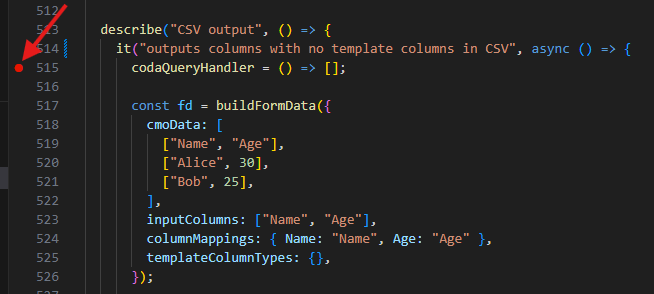
  • In the unit test file set the breakpoint at the failing line by clicking the margin of the code
Open the JavaScript Debug Terminal

  • Press CTRL-SHIFT-P (CMD-SHIFT-P on Mac) and on the top of the screen select JavaScript Debug Terminal
  • In the dropdown on the top select the directory to open the terminal in

Start the debugger

  • In the terminal window execute the command
cd PATH_TO_THE_APPLICATION && pnpm vitest run app/routes/THE_UNIT_TESTFILE_NAME.ts -t "THE_NAME_OF_THE_UNIT_TEST_IN_THE_it_STATEMENT"

When the test reaches the breakpoint, the execution stops, and the variable values are available by hovering over them and on the left side of the screen.

Author

Laszlo Pinter

Follow Me
Other Articles
Previous

Set up Easy Auth with Microsoft Azure Entra ID

Next

Debugging web applications in the Visual Studio Code Integrated Browser

No Comment! Be the first one.

Leave a Reply Cancel reply

Your email address will not be published. Required fields are marked *

Search

Last Changes

  • DevOps Engineering part 1. (Mac) - Make your Macintosh easier to use June 25, 2026
  • Japan travel tips June 22, 2026
  • How to stop the rain and snow in Cities: Skylines II June 20, 2026
  • Cities: Skylines II Developer Mode June 20, 2026
  • 'CSII_MANAGEDPATH' has incorrect path(s) when building Cities: Skylines II mod June 20, 2026

Tags

.NET .NETcore 3Dprinting ASP.NET Core AutodeskInventor AWS C# Chef cloud DevOps Docker EntityFramework Games Git Go iOS iPad iPhone iPod Java Kubernetes Linux MacOSX MSSQL MVC Node.js Packer PowerShell Python RDS RightScale Ruby security Splunk TeamCity Terraform TestKitchen Tomcat Ubuntu Vagrant VirtualBox VisualStudio Windows WordPress Xcode

Recent Comments

  • Zengei László on MyHeritage családfa exportálása és küldése emailben
  • Raúl Castillo on DynDns update error
  • MICHAEL on Windows Media Player 12 cannot find the album information
  • Nargis on Configure Epson ET-3850 scanning on Windows 11
  • Venczelné Zemen Erika on Delta S2302 termosztát programozása

–

  • Log in
  • Entries feed
  • Comments feed
  • WordPress.org
Copyright 2026 — Pinter Computing. All rights reserved.