Skip to content
Pinter Computing

Knowledge Base for IT Professionals, Teachers, and Astronauts

Pinter Computing

Knowledge Base for IT Professionals, Teachers, and Astronauts

  • Home
  • Programming
  • DevOps
  • Project Management
  • Software and Hardware
  • Miscellaneous
  • Egyebek
  • About
  • Experience
  • Education
  • Contact
  • Home
  • Programming
  • DevOps
  • Project Management
  • Software and Hardware
  • Miscellaneous
  • Egyebek
  • About
  • Experience
  • Education
  • Contact
Close

Search

Home/Software Development/Frameworks/.NET Core Framework/Add jQuery DataTables grid to an ASP.NET Core MVC web application
.NET Core FrameworkMicrosoft Visual StudioMVCSoftware Development

Add jQuery DataTables grid to an ASP.NET Core MVC web application

By Laszlo Pinter
September 29, 2018 1 Min Read
1

ASP.NET does not provide sortable, searchable tables. jQuery DataTables is a popular way to display user-friendly data in an ASP.NET Core MVC web application.

Set up the environment

  1. Add the System.Linq.Dynamic.Core NuGet package to the web application
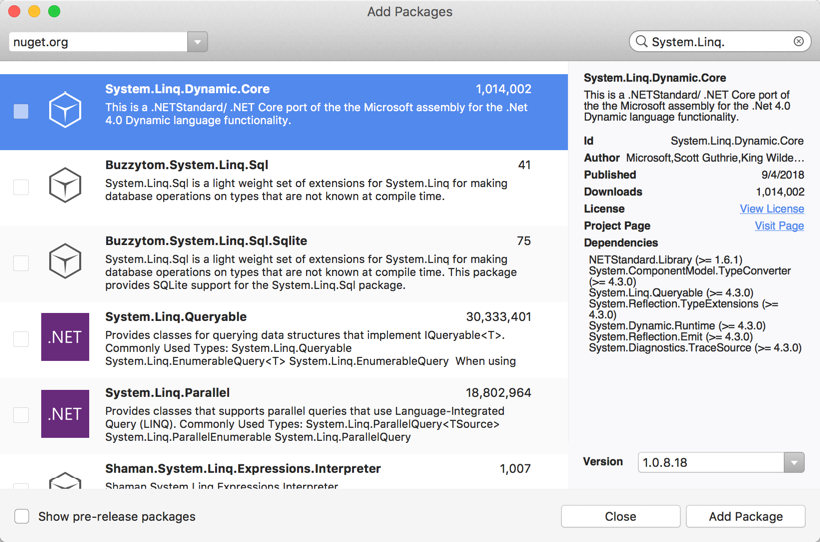
  2. Add the JsonOptions to the Startup.cs file
     using Newtonsoft.Json.Serialization;
  3. Add the AddJsonOptions to the services.AddMvc() section in the ConfigureServices() method of the Startup.cs file
     .AddJsonOptions(options => options.SerializerSettings.ContractResolver = new DefaultContractResolver());

Add the jQuery DataTables grid to the view

  1. Add the script and css references to the bottom of the view
    @section Scripts {
    	<!-- For the DataTables grid -->
    	<link rel="stylesheet" type="text/css" href="https://cdn.datatables.net/1.10.19/css/jquery.dataTables.css">
    	<script type="text/javascript" src="https://cdn.datatables.net/1.10.16/js/jquery.dataTables.min.js"></script>
    
    	<!-- Page-specific script -->
    	<script src="~/js/MY-CONTROLLER_MY-PAGE.js" asp-append-version="true"></script>
    }
  2. Add to the page-specific MY-CONTROLLER_MY-PAGE.js file to the wwwroot\js directory
    $(document).ready(function () {
    
      // Set up the DataTable grid
      $('#serverTable').DataTable();
    
    });
  3. Create a table with the same id referenced in the script
    @if (null != Model.ServerList) {
      <table id="serverTable" class="table table-striped table-bordered dt-responsive nowrap" width="100%">
        <thead>
          <tr>
            <th></th>
            <th>Name</th>
            ...
          </tr>
        </thead>
        <tbody>
          @foreach (ServerInstance instance in Model.ServerList) {
            <tr>
              <td><input type="checkbox" asp-for="@instance.Selected" /></td>
              <td>@instance.NameTag</td>
              ...
            </tr>
          }
        </tbody>
      </table>
    }

 

Tags:

ASP.NET CoreMVC
Author

Laszlo Pinter

Follow Me
Other Articles
Previous

The user account does not have permission to run this task

Next

Add identity into an ASP.NET Core 2.1 MVC project and maintain full control of the Identity UI

One Comment
  1. Alexandru Zidariu says:
    August 1, 2019 at 3:46 pm

    Sorry for – maybe stupid – question but can you be more explicit with :
    Model.ServerList from : @if (null != Model.ServerList) expresion
    and
    ServerInstance instance in Model.ServerList from : @foreach (ServerInstance instance in Model.ServerList)
    I am beginner in .net core mvc and I am trying to understand !

    Reply

Leave a Reply Cancel reply

Your email address will not be published. Required fields are marked *

Search

Last Changes

  • DevOps Engineering part 1. (Mac) - Make your Macintosh easier to use June 25, 2026
  • Japan travel tips June 22, 2026
  • How to stop the rain and snow in Cities: Skylines II June 20, 2026
  • Cities: Skylines II Developer Mode June 20, 2026
  • 'CSII_MANAGEDPATH' has incorrect path(s) when building Cities: Skylines II mod June 20, 2026

Tags

.NET .NETcore 3Dprinting ASP.NET Core AutodeskInventor AWS C# Chef cloud DevOps Docker EntityFramework Games Git Go iOS iPad iPhone iPod Java Kubernetes Linux MacOSX MSSQL MVC Node.js Packer PowerShell Python RDS RightScale Ruby security Splunk TeamCity Terraform TestKitchen Tomcat Ubuntu Vagrant VirtualBox VisualStudio Windows WordPress Xcode

Recent Comments

  • Zengei László on MyHeritage családfa exportálása és küldése emailben
  • Raúl Castillo on DynDns update error
  • MICHAEL on Windows Media Player 12 cannot find the album information
  • Nargis on Configure Epson ET-3850 scanning on Windows 11
  • Venczelné Zemen Erika on Delta S2302 termosztát programozása

–

  • Log in
  • Entries feed
  • Comments feed
  • WordPress.org
Copyright 2026 — Pinter Computing. All rights reserved.