Skip to content
Pinter Computing

Knowledge Base for IT Professionals, Teachers, and Astronauts

Pinter Computing

Knowledge Base for IT Professionals, Teachers, and Astronauts

  • Home
  • Programming
  • DevOps
  • Project Management
  • Software and Hardware
  • Miscellaneous
  • Egyebek
  • About
  • Experience
  • Education
  • Contact
  • Home
  • Programming
  • DevOps
  • Project Management
  • Software and Hardware
  • Miscellaneous
  • Egyebek
  • About
  • Experience
  • Education
  • Contact
Close

Search

Home/Knowledge Base/Configuring ChatGPT for Software Development
Knowledge Base

Configuring ChatGPT for Software Development

By Laszlo Pinter
November 14, 2025 1 Min Read
0

ChatGPT Enterprise promises not to use chat history for model training, so the enterprise data stays within the environment.

To set up ChatGPT for software development

On macOS

Install the Codex CLI command line tool with Homebrew

brew install codex

or with npm

npm i -g @openai/codex

On Windows

See the Windows setup guide at Running Codex on Windows

Launch Codex CLI

In the terminal execute

codex

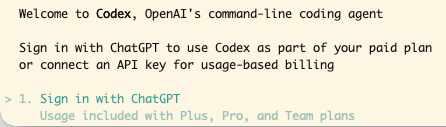
Sign in with ChatGPT

Chose the login method you used to create the account. Fort SSO authentication enter your company email address and click the Continue button.

If you get the error message

An error occurred during authentication (codex_cli_workspace_disabled). Please try again.

You can contact us through our help center at help.openai.com if you keep seeing this error. (Please include the request ID

the Codex CLI feature is not enabled in your account.

To update Codex CLI

In a terminal execute

npm i -g @openai/codex@latest
Author

Laszlo Pinter

Follow Me
Other Articles
Previous

Practical Travel Tips for Europe

Next

Microsoft Azure DevOps Overview

No Comment! Be the first one.

Leave a Reply Cancel reply

Your email address will not be published. Required fields are marked *

Search

Last Changes

  • Install software development tools on Windows October 4, 2026
  • Install Chocolatey October 4, 2026
  • Install and configure Visual Studio Code October 4, 2026
  • Using Plan mode in GitHub Copilot September 9, 2026
  • AI - Artificial Intelligence September 9, 2026

Tags

.NET .NETcore 3Dprinting ASP.NET Core AutodeskInventor AWS C# Chef cloud DevOps Docker EntityFramework Git Go iOS iPad iPhone iPod Java Kubernetes Linux MacOSX MSSQL MVC MySql Node.js Packer PowerShell Python RDS RightScale Ruby security Splunk TeamCity Terraform TestKitchen Tomcat Ubuntu Vagrant VirtualBox VisualStudio Windows WordPress Xcode

Recent Comments

  • Laszlo Pinter on Turn off the built in touchpad when a mouse is attached
  • Kenneth Bush on Turn off the built in touchpad when a mouse is attached
  • Zengei László on MyHeritage családfa exportálása és küldése emailben
  • Raúl Castillo on DynDns update error
  • MICHAEL on Windows Media Player 12 cannot find the album information

–

  • Log in
  • Entries feed
  • Comments feed
  • WordPress.org
Copyright 2026 — Pinter Computing. All rights reserved.