The default MSSQL server installation only enables the Shared Memory network protocol for connection.
Node.js can only connect using TCP/IP protocol. The error message is
Failed to connect to localhost/…. Error: Failed to connect to localhost:1433 – Could not connect (sequence) Failed to connect to localhost:1433 – Could not connect (sequence) ConnectionError: Failed to connect to localhost:1433 – Could not connect (sequence)
Enable the TCP/IP protocol
To be able to connect to a local MSSQL Server from a Node.js application, we need to enable the TCP/IP protocol.
- Open the SQL Server Configuration Manager as administrator
Right-click the SQL Server Configuration Manager item in the start menu, select More, and click the Run as administrator option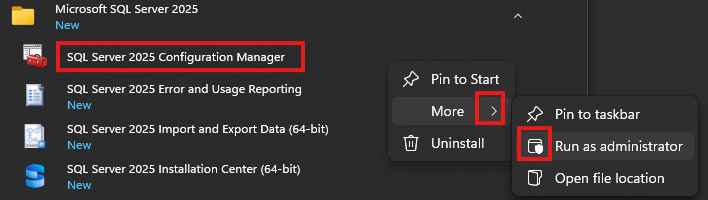
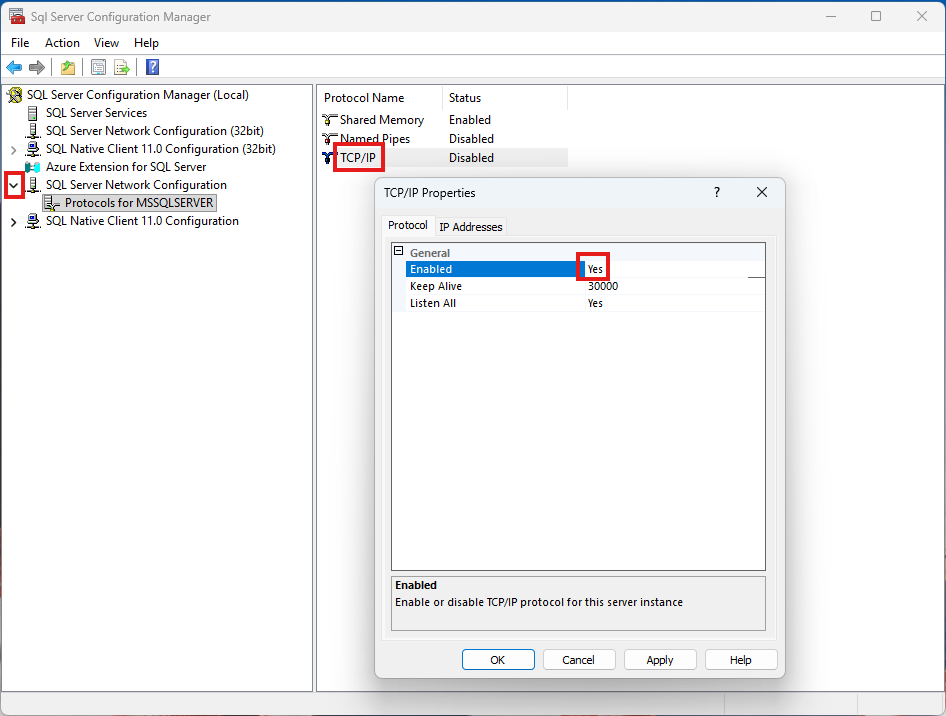
- In the SQL Server Network Configuration select Protocols for MSSQL SERVER, and double-click the TCP/IP option. Set the Enabled value to Yes
- The dialog box reminds us to restart the MSSQL Server for the change to take effect
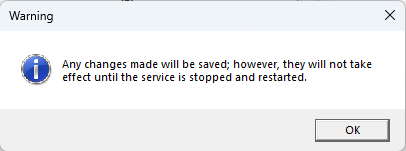
Restart the MSSQL Server
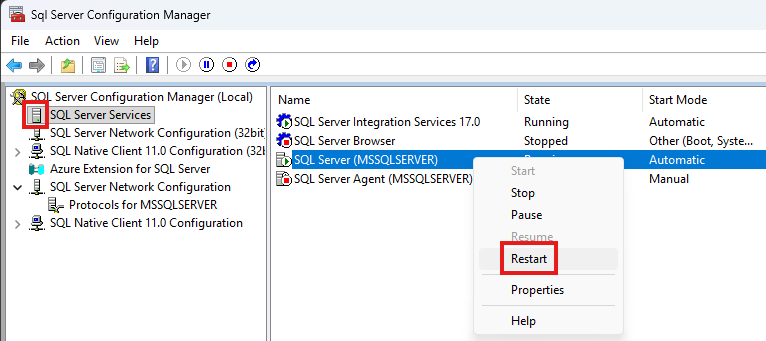
- On the left side select SQL Server Services, right-click MSSQL Server and select Restart