
Log into Claude CLI
As AgentCraft uses your Claude Pro or Max subscription, first, you need to log into Claude CLI.
- Open a terminal in the project folder and start Claude CLI with
claude- In the Claude CLI enter
/loginFollow the instructions to authorize Claude CLI to use your Anthropic subscription and paste the token from the browser window into the CLI.
Run AgentCraft
- In a terminal navigate to the project folder
- Execute the command
npx @idosal/agentcraftThe AgentCraft UI opens in your default web browser
Approving actions
If Manual approval is selected in the lower right corner (the button is hidden behind the thick fancy border), AgentCraft will ask for approval. 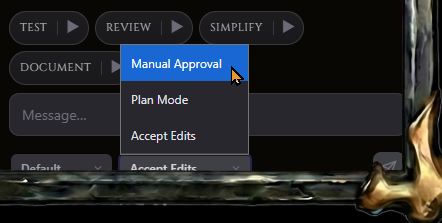
To approve the action
- In the Claude CLI press enter to move the process forward
- Claude CLI will ask for permission and execute the command of AgentCraft
