
To access Chocolatey packages in your private network you need to download them from the Internet and store them at a location where all servers can access them. You can internalize Chocolatey packages if you have a Chocolatey Business subscription.
You can use an Artifactory server to host the internalized packages.
List of available packages
To get the list of the available Chocolatey packages on an Artifactory server
choco list -s http://ARTIFACTORY_SERVER_URL/artifactory/api/nuget/ARTIFACTORY_REPOSITORY_NAME
Non copyrighted applications
If the Chocolatey package does not contain copyrighted components, Chocolatey can download and repackage the entire package, including the application.
Download a Chocolatey package from the Internet and store it on your local drive
choco download PACKAGE_NAME --internalize
To store the Chocolatey packages on an Artifactory server
- The Artifactory server has to have a Pro license
- Create a NuGet type local repository
Upload all packages from your local drive to an Artifactory server. Some of the large packages depend on other NuGet packages that have to be available on your Artifactory server.
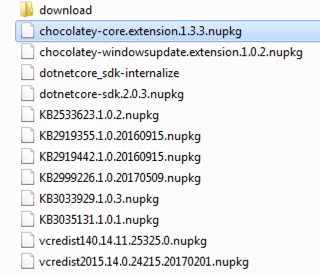
curl -u ARTIFACTORY_USERNAME:ARTIFACTORY_PASSWORD -X PUT "http://ARTIFACTORY_SERVER_URL/artifactory/ARTIFACTORY_REPOSITORY_NAME/FOLDER_NAME/PACKAGE_FILE_NAME.nupkg" -T ./PACKAGE_FILE_NAME.nupkg
Copyrighted applications
If the Chocolatey package installs an application that is copyrighted, the author of the package cannot publish the copyrighted source, but can place the download location and installation process into the package.
Internalize the package
To download the necessary files and create a custom Chocolatey package with copyrighted application source:
-
- Download the Chocolatey package without the internalize option
choco download PACKAGE_NAME
Example:
choco download javaruntime
- Delete the small .nupkg files. These are too small to contain the installer files. We will recreate them in a subfolder with the downloaded installer files.
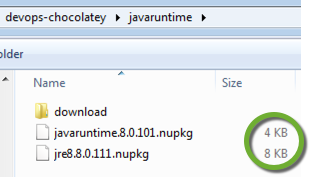
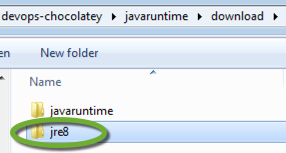
- Find the package folder in the download sub-folder that has a tools subfolder. In the case of “javaruntime”, the real package is the “jre8”, not “javaruntime”.
- Open the tools\chocolateyInstall.ps1 file
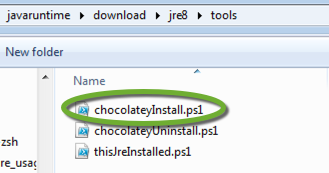
- Find the download urls of the installer files.
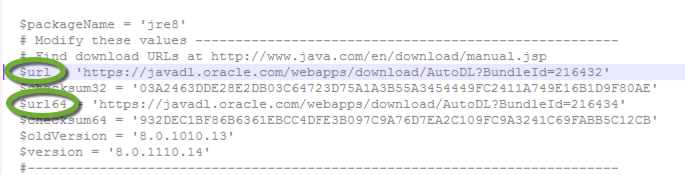
Some scripts contain variables for the version of the application, so you have to manually assemble the final download URL.
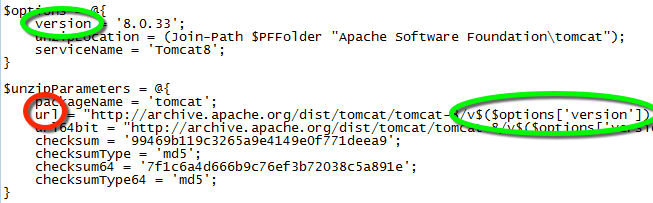
- Assemble the actual download URL and download the application source with your web browser,
- Place the downloaded installer files into the tools folder,
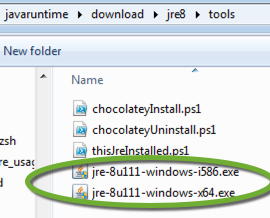
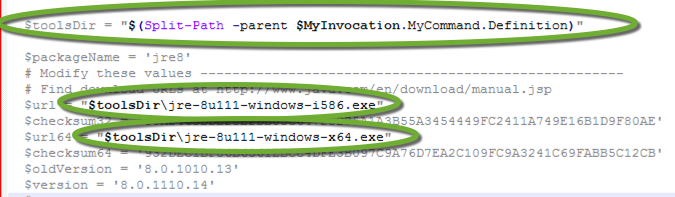
- Update the chocolateyInstall.ps1 to point to the installer files in the package:
- Add the following before the $url =… and $url64 =… statements
$toolsDir = "$(Split-Path -parent $MyInvocation.MyCommand.Definition)"
- Replace the the $url =… and $url64 =… statements. Use the actual file names, and make sure to use double quotes (“) for the string interpolation to work!
$url = "$toolsDir\32_BIT_INSTALLER_FILE"
$url64 = "$toolsDir\64_BIT_INSTALLER_FILE"
- Add
-UseOriginalLocation
to the Install-ChocolateyPackage line.

- Add the following before the $url =… and $url64 =… statements
- Right click the .nuspec file in the package folder and select Compile Chocolatey Package
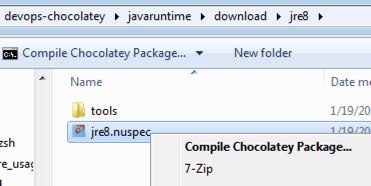
(or execute choco pack PATH\TO\NUSPEC.nuspec) - The package is created in the folder of the .nuspec file and the file name is the composite of id + “.” + version tag values in the .nuspec file.
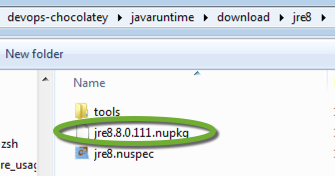
- Download the Chocolatey package without the internalize option
Upload the package to the local repository
- In the command line execute
curl -u ARTIFACTORY_USERNAME:ARTIFACTORY_PASSWORD -X PUT "http://ARTIFACTORY_SERVER_URL/artifactory/ARTIFACTORY_REPOSITORY_NAME/PACKAGE_NAME/PACKAGE_FILE_NAME.nupkg" -T PATH/TO/PACKAGE_FILE_NAME.nupkg
Video tutorials
- Package Synchronizer
