
Kubernetes Services route traffic across a set of pods. The service specifies how deployments (applications) are exposed to each other or the outside world.
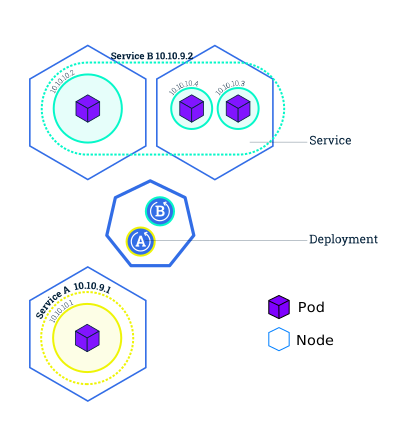
Service types
The service type specifies how the deployment will be exposed
ClusterIP
The ClusterIP service is only visible within the cluster. To expose the pod to other services in the cluster
- set the published port with spec: port:
- set the port inside the container with spec: targetPort:
- other services can find this service by its name, specified by metadata: name: even if the IP address of the pod changes
- spec: selector: specifies the label of the template within the deployment. All pods started by the template will back the service.
- set the service type to ClusterIP with spec: type: to only expose it within the cluster. Use Ingress to expose your Service outside of the cluster with consolidated proxy rules via a single IP address.
apiVersion: v1
kind: Service
metadata:
  name: app1-frontend-service
spec:
  selector:
    app: app1-frontend-template-label
  ports:
    - protocol: TCP
      port: 8080
      targetPort: 80
LoadBalancer
Creates a load balancer external to the cluster and points itself to the nodes to expose the application outside of the cluster.
For security reasons large organizations don’t allow the creation of multiple load balancers. During the cluster creation they temporarily lift the restriction and one ingress load balancer is created. All inbound communication to the cluster passes through that load balancer.
Best practices
Don’t specify the hostPort for a Pod unless it is really necessary, as it limits the flexibility of the resource creation, because each hostIP, hostPort, protocol combination has to be unique within the cluster.
Avoid using the hostNetwork as it also limits the networking flexibility.
Use the IPVS proxy mode, as other proxy modes, userspace and iptables are based on iptables operations that slow down dramatically in large scale cluster e.g 10,000 Services. IPVS-based kube-proxy also has more sophisticated load balancing algorithms (least conns, locality, weighted, persistence).
Commands
List all pods
kubectl get podsList all deployments
kubectl get deploymentsList all services of the cluster.
kubectl get servicesCreate a new service and expose a poet of the pod via a node port (the same random port on every node)
kubectl expose deployment/MY_DEPLOYMENT_NAME --type="NodePort" --port 8080To find the IP and port of the endpoint where the service is exposed, see the value of the ‘Endpoints:’ in the output of the describe command
kubectl describe services/MY_SERVICE_NAMEThe endpoint is the pod IP and port. If the service is a web site or API you can test it with
curl ENDPOINT_IP:ENDPOINT_PORTTo test the pod via the service get the Kubernetes cluster IP and use the ‘NodePort:’ value
curl CLUSTER_IP:NODE_PORTGet the ‘Labels:’ of the service from the output of the describe command above. List the pods of the service
kubectl get pods -l run=LABEL_IN_SERVICEList the service of the pod by label
kubectl get services -l run=LABEL_IN_SERVICEAdd a new label to the pod
kubectl label pod MY_POD_NAME app=v1Display the pod information
kubectl describe pods MY_POD_NAMEDelete the service by label
kubectl delete service -l run=LABEL_IN_SERVICE