Skip to content
Pinter Computing

Knowledge Base for IT Professionals, Teachers, and Astronauts

Pinter Computing

Knowledge Base for IT Professionals, Teachers, and Astronauts

  • Home
  • Programming
  • DevOps
  • Project Management
  • Software and Hardware
  • Miscellaneous
  • Egyebek
  • About
  • Experience
  • Education
  • Contact
  • Home
  • Programming
  • DevOps
  • Project Management
  • Software and Hardware
  • Miscellaneous
  • Egyebek
  • About
  • Experience
  • Education
  • Contact
Close

Search

Home/Knowledge Base/Hosting a second site on an AWS Lightsail instance
Knowledge Base

Hosting a second site on an AWS Lightsail instance

By Laszlo Pinter
November 2, 2026 2 Min Read
0

If you already host WordPress on your Lightsail instance you can set up a second website on it.

  • Log into the AWs console at console.aws.com
  • In the search field enter lightsail and select Lightsail
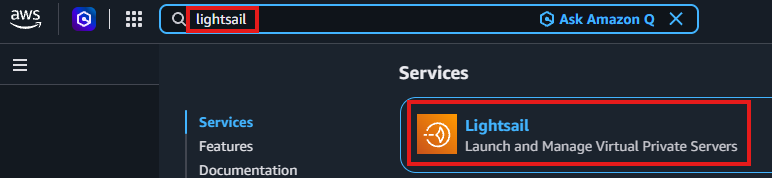
  • Select the LIghtsail instance
  • Log into the Lightsail instance with SSH

  • Create a directory for the second website. Execute the following commands in the terminal
sudo mkdir -p /var/www/MYSITE
sudo chown -R $USER:www-data /var/www/MYSITE
sudo chmod -R 755 /var/www/MYSITE

Upload the site with SFTP

  • Install the free SFTP Explorer from https://apps.microsoft.com/detail/9n6s8v9qq224?hl=en-US&gl=US
  • Connect to the Lightsail instance with the SFTP client
  • Upload the site contents to the /var/www/mysite directory

Configure the Apache Virtual Host

  • In the SSH session execute
sudo nano /etc/apache2/sites-available/MYSITE.conf
  • Paste the following in to the file
<VirtualHost *:80>
    ServerName ://YOURDOMAIN.COM
    DocumentRoot /var/www/MYSITE

    <Directory /var/www/MYSITE>
        Options Indexes FollowSymLinks
        AllowOverride All
        Require all granted
    </Directory>

    ErrorLog ${APACHE_LOG_DIR}/MYSITE_error.log
    CustomLog ${APACHE_LOG_DIR}/MYSITE_access.log combined
</VirtualHost>
  • Press Ctrl + O, then Enter to save, and Ctrl + X to exit.

Enable the website and restart the service

sudo a2ensite MYSITE.conf
sudo apache2ctl configtest
sudo systemctl restart apache2

Add an alias for the new site to the available sites files (HTTP and HTTPS)

  • Execute
sudo nano /etc/apache2/sites-available/000-default.conf
  • Add an alias in the <VirtualHost *:80> block
Alias /MYSITE/var/www/MYSITE
  • Add the allias to the HTTPS protocol too
sudo nano /etc/apache2/sites-available/default-ssl.conf 
  • Add an alias to the <VirtualHost *:443> block
Alias /MYSITE /var/www/MYSITE
  • Retest the server
sudo apache2ctl configtest
sudo systemctl restart apache2

Accessing the second website

The second site is available through the primary domain name and a folder name

  • In the web browser navigate to YOURDOMAIN.COM/MYSITE

Author

Laszlo Pinter

Follow Me
Other Articles
Previous

Installing the modding tool chain for Cities: Skylines 2

Next

Generating high resolution Cities: Skylines II map images and height maps

No Comment! Be the first one.

Leave a Reply Cancel reply

Your email address will not be published. Required fields are marked *

Search

Last Changes

  • Generating high resolution Cities: Skylines II map images and height maps November 3, 2026
  • Image overlay in Cities: Skylines 2 November 3, 2026
  • Cities: Skylines II November 3, 2026
  • WordPress November 2, 2026
  • Hosting a second site on an AWS Lightsail instance November 2, 2026

Tags

.NET .NETcore 3Dprinting ASP.NET Core AutodeskInventor AWS C# Chef cloud DevOps Docker EntityFramework Git Go iOS iPad iPhone iPod Java Kubernetes Linux MacOSX MSSQL MVC MySql Node.js Packer PowerShell Python RDS RightScale Ruby security Splunk TeamCity Terraform TestKitchen Tomcat Ubuntu Vagrant VirtualBox VisualStudio Windows WordPress Xcode

Recent Comments

  • Laszlo Pinter on Turn off the built in touchpad when a mouse is attached
  • Kenneth Bush on Turn off the built in touchpad when a mouse is attached
  • Zengei László on MyHeritage családfa exportálása és küldése emailben
  • Raúl Castillo on DynDns update error
  • MICHAEL on Windows Media Player 12 cannot find the album information

–

  • Log in
  • Entries feed
  • Comments feed
  • WordPress.org
Copyright 2026 — Pinter Computing. All rights reserved.