
The “chocolatey_package” Chef resource can install NuGet packages from Artifactory.
Artifactory is inconsistent in case sensitivity when an application is searching for a NuGet package. When we specify the package ID only, the search is not case sensitive. If the package is called “GoogleChrome” and we search for “googlechrome” the NuGet package is found in Artifactory.
chocolatey_package 'googlechrome' do
  source 'devops-chocolatey'
  options "--allow-empty-checksums --ignore-package-exit-codes"
end
When we specify the version of the package, the search becomes case sensitive in Artifactory. The “chocolatey_package” Chef resource automatically converts the package IDs to lowercase, even if we spell the package ID the same as it is in Artifactory, so “GoogleChrome” can never be found in Artifactory when we specify the NuGet package version.
chocolatey_package 'GoogleChrome' do
  version '66.0.3359.18100'
  source 'devops-chocolatey'
  options "--allow-empty-checksums --ignore-package-exit-codes"
end
The following error message is misleading. In this case, the version was in Artifactory, but the spelling of the package ID is not all lower case in Artifactory.
googlechrome not installed. The package was not found with the source(s) listed.
If you specified a particular version and are receiving this message, it is possible that the package name exists but the version does not.
Version: “66.0.3359.18100”
Source(s): “http://artifactory….”
When we internalize the “googlechrome” Chocolatey package, the package ID in the NuGet package will be spelled as “GoogleChrome”. The “internalize” process downloads the NuGet package from the Chocolatey server, downloads the necessary installer files from the source URL specified in the NuGet package, and creates a new NuGet package that contains all necessary files for the software installation. To have access to these packages any time, even when the Chocolatey package is no longer available at Chocolatey.org, we can upload them to Artifactory or other NuGet repository.
To solve the case sensitivity issue, currently, the only solution is to unzip the package, change the spelling of the ID to lower case and re-create the package again.
- Install Chocolatey on your Windows workstation. See Install Chocolatey
- Open a Windows command prompt as Administrator
- Internalize the package
choco download googlechrome --internalize
- Unzip the NuGet package
- Right-click the .nupkg file and select 7-Zip, Extract to “…”
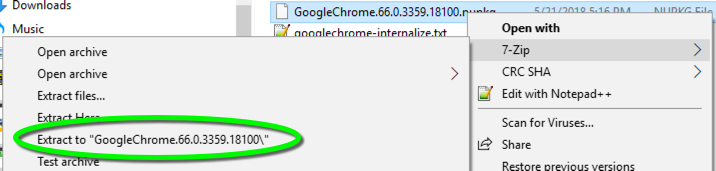
- Open the .nuspec file in a text editor
- Change the ID to all lower case
<id>googlechrome</id>
- Save the .nuspec file
- Right-click the .nupkg file and select 7-Zip, Extract to “…”
- Re-create the NuGet package
- Delete the existing _rels folder, the package creation will recreate it with updated information
- Right-click the .nuspec file and select Compile Chocolatey Package…

- Upload the NuGet package to Artifactory.
