Skip to content
Pinter Computing

Knowledge Base for IT Professionals, Teachers, and Astronauts

Pinter Computing

Knowledge Base for IT Professionals, Teachers, and Astronauts

  • Home
  • Programming
  • DevOps
  • Project Management
  • Software and Hardware
  • Miscellaneous
  • Egyebek
  • About
  • Experience
  • Education
  • Contact
  • Home
  • Programming
  • DevOps
  • Project Management
  • Software and Hardware
  • Miscellaneous
  • Egyebek
  • About
  • Experience
  • Education
  • Contact
Close

Search

Home/_ Other/Conditional compilation symbols in Microsoft Visual Studio
_ Other

Conditional compilation symbols in Microsoft Visual Studio

By Laszlo Pinter
April 9, 2013 2 Min Read
2

If you need to make breaking changes in your source code that will be deployed later to production, but first have to be tested in the development environment you can include conditional compilation symbols to specify which lines will be included in the application for certain environments. This way you can maintain environment specific versions of the source code, the current version for  production and the new version for development and testing.

In this example we will make a change in our source code that we want to deploy to the Development environment for testing, but not to QA, UAT and Production.

Create the conditional compilation symbol in the project

  • Right click the project
  • Select Properties
  • On the left side select the Build tab
  • Select Dev in the Configuration dropdown
  • Enter new_version into the Conditional compilation symbols field
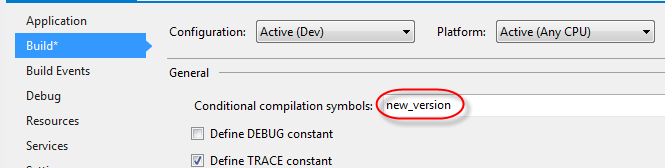
visual studio conditional compilation symbol in project


Add the conditional compilation symbol to the source code

  • Surround the old and new code with a #if, #else, #endif structure

#if new_version

// New code
int a = 1;

#else

// Old code
int a = 0;

#endif

int b = a;

If the Dev configuration is selected the new code will be compiled into the application
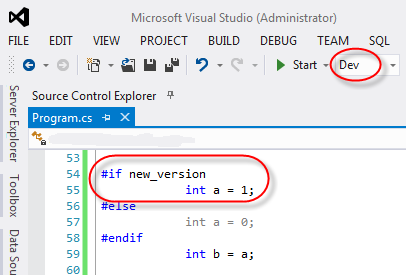
visual studio conditional compilation symbol true


If another configuration (QA) is selected the old code will be compiled into the application
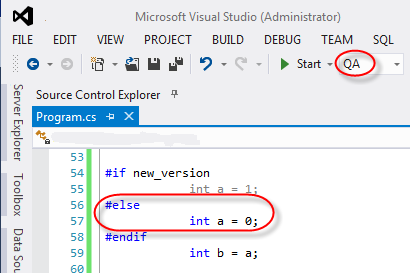
visual studio conditional compilation symbol false

Author

Laszlo Pinter

Follow Me
Other Articles
Previous

Microsoft Visual Studio editor settings

Next

How to enable jQuery intellisense in Microsoft Visual Studio

2 Comments
  1. Keep different versions of one program - Visual Studio - visual-studio says:
    January 13, 2016 at 9:18 pm

    […] take @ illustration here: https://pinter.org/?p=1060 […]

    Reply
  2. calfeehagesfeld says:
    March 11, 2020 at 10:54 am

    NOTE: there is a big in VS 2019 prior to 16.4.5. If you are not there yet, please update or there could be an issue with using Conditional Compilation Symbols

    Reply

Leave a Reply Cancel reply

Your email address will not be published. Required fields are marked *

Search

Last Changes

  • DevOps Engineering part 1. (Mac) - Make your Macintosh easier to use June 25, 2026
  • Japan travel tips June 22, 2026
  • How to stop the rain and snow in Cities: Skylines II June 20, 2026
  • Cities: Skylines II Developer Mode June 20, 2026
  • 'CSII_MANAGEDPATH' has incorrect path(s) when building Cities: Skylines II mod June 20, 2026

Tags

.NET .NETcore 3Dprinting ASP.NET Core AutodeskInventor AWS C# Chef cloud DevOps Docker EntityFramework Games Git Go iOS iPad iPhone iPod Java Kubernetes Linux MacOSX MSSQL MVC Node.js Packer PowerShell Python RDS RightScale Ruby security Splunk TeamCity Terraform TestKitchen Tomcat Ubuntu Vagrant VirtualBox VisualStudio Windows WordPress Xcode

Recent Comments

  • Zengei László on MyHeritage családfa exportálása és küldése emailben
  • Raúl Castillo on DynDns update error
  • MICHAEL on Windows Media Player 12 cannot find the album information
  • Nargis on Configure Epson ET-3850 scanning on Windows 11
  • Venczelné Zemen Erika on Delta S2302 termosztát programozása

–

  • Log in
  • Entries feed
  • Comments feed
  • WordPress.org
Copyright 2026 — Pinter Computing. All rights reserved.