Skip to content
Pinter Computing

Knowledge Base for IT Professionals, Teachers, and Astronauts

Pinter Computing

Knowledge Base for IT Professionals, Teachers, and Astronauts

  • Home
  • Programming
  • DevOps
  • Project Management
  • Software and Hardware
  • Miscellaneous
  • Egyebek
  • About
  • Experience
  • Education
  • Contact
  • Home
  • Programming
  • DevOps
  • Project Management
  • Software and Hardware
  • Miscellaneous
  • Egyebek
  • About
  • Experience
  • Education
  • Contact
Close

Search

Home/Knowledge Base/DevOps Workflow
Knowledge Base

DevOps Workflow

By Laszlo Pinter
November 15, 2025 2 Min Read
0

DevOps is the combination of two areas of information technology: Development and Operations. DevOps engineers work very closely with software developers and operation engineers to fully automate the creation and configuration of the cloud infrastructure and the build, testing and deployment of the applications. The best DevOps engineers come from software development and have a good understanding of operating systems, networking and data storage technologies.
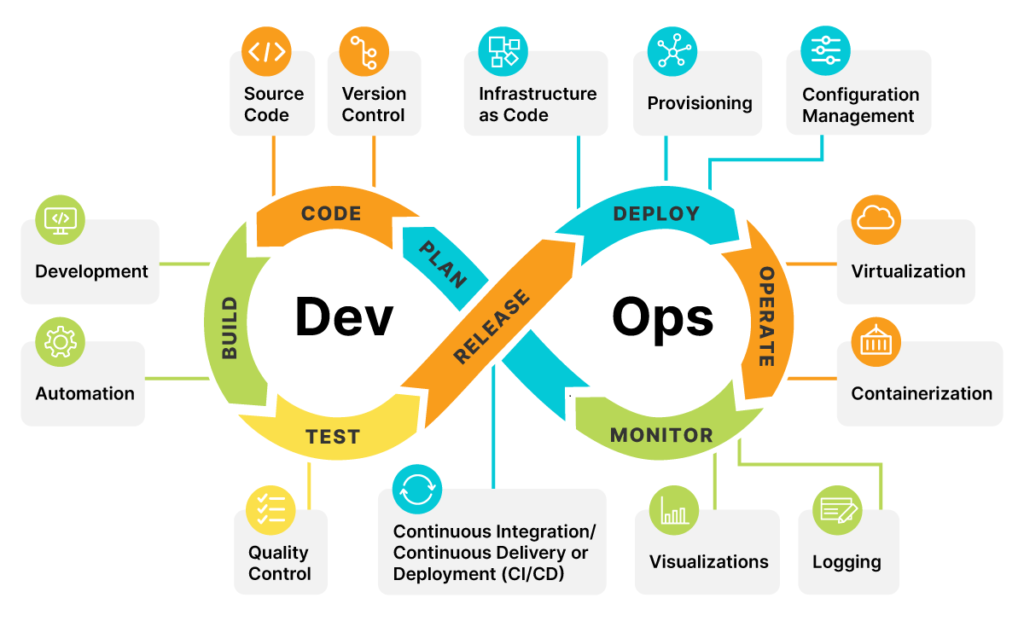
CI/CD Pipelines

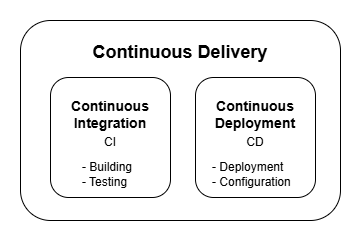
There are multiple interpretations of the origin of the acronym. The one I prefer explains CI/CD (Continuous Integration and Continuous Deployment), together Continuous Delivery pipelines, as the building, testing, deployment and configuration of applications. It can operate on-premises and cloud environments.
Continuous Integration (CI)

Continuous Integration automates the

  • Building
  • Testing

of the software. This allows developers to frequently merge code changes into the central repository to build and test the result of small updates. It is much easier to found and correct an error in a small change, than in a large, significant modification. This provides frequent feedback of on the quality of the code and allows stakeholders to follow the development process.

Continuous Deployment (CD)

The goal is to ensure the rapid and reliable release and deployment of the software to production. Automates the

  • Configuration
  • Deployment

of the application. Usually every merged change is automatically deployed to the Development environment, so it is available for human testing any time. The deployment to higher environments (QA, UAT, Production) can be automatic or manual.

Author

Laszlo Pinter

Follow Me
Other Articles
Previous

Microsoft Azure CLI

Next

Microsoft Azure Pipelines

No Comment! Be the first one.

Leave a Reply Cancel reply

Your email address will not be published. Required fields are marked *

Search

Last Changes

  • Install Git on Windows October 16, 2026
  • How to create a bootable USB drive to install Windows 11 October 11, 2026
  • Nautilus U618 exercise bike magnetic brake adjustment October 11, 2026
  • Health October 11, 2026
  • Limit the battery charge level on MSI laptops October 7, 2026

Tags

.NET .NETcore 3Dprinting ASP.NET Core AutodeskInventor AWS C# Chef cloud DevOps Docker EntityFramework Git Go iOS iPad iPhone iPod Java Kubernetes Linux MacOSX MSSQL MVC MySql Node.js Packer PowerShell Python RDS RightScale Ruby security Splunk TeamCity Terraform TestKitchen Tomcat Ubuntu Vagrant VirtualBox VisualStudio Windows WordPress Xcode

Recent Comments

  • Laszlo Pinter on Turn off the built in touchpad when a mouse is attached
  • Kenneth Bush on Turn off the built in touchpad when a mouse is attached
  • Zengei László on MyHeritage családfa exportálása és küldése emailben
  • Raúl Castillo on DynDns update error
  • MICHAEL on Windows Media Player 12 cannot find the album information

–

  • Log in
  • Entries feed
  • Comments feed
  • WordPress.org
Copyright 2026 — Pinter Computing. All rights reserved.