
To disable the Caps Lock key in Windows 11 you can edit the registry.
DISCLAIMER: THIS CAN ALTER HOW YOUR KEYBOARD WORKS, DO IT AT YOUR OWN RISK!!!!
For the original full instructions see
The details are
- Open the registry editor, regedit
- BACK UP THE ENTIRE REGISTRY BEFORE YOU MAKE ANY CHANGES
- Right-click the Computer element and select Export
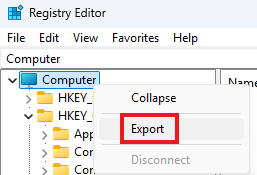
- Save the file in a location where you will find it
- Right-click the Computer element and select Export
- Add the
Scancode Mapbinary value to the HKEY_LOCAL_MACHINE\SYSTEM\CurrentControlSet\Control\Keyboard Layout key with the value
00 00 00 00 00 00 00 00 02 00 00 00 00 00 3A 00 00 00 00 00

- Check, and double check, and triple check the value before saving it. A wrong value can disable certain keys on your keyboard until you are able to reverse the change. If you disable the wrong key that is necessary to log into Windows, use the on-screen keyboard with the mouse to log in and use the mouse to open Regedit and correct the error.
- Restart the computer for the changes to take effect
