AI Plan mode is a new feature in GitHub Copilot. Plan mode can make design decisions with your active participation, and when you are satisfied with the recommended steps, initiates the implementation using the same or selected agent.
To start Plan mode in GitHub Copilot
- Open the GitHub Copilot AI chat side bar

- Start a new session (CTRL-N)
- At the bottom select the Plan option, and select the agent
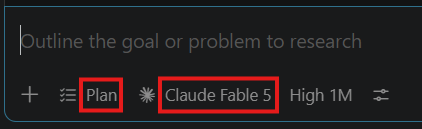
- Enter the prompt to describe the task
- Answer the AI model’s questions to help to make decisions
- When a plan is presented provide more instructions, or click the Start implementation button