Skip to content
Pinter Computing

Knowledge Base for IT Professionals, Teachers, and Astronauts

Pinter Computing

Knowledge Base for IT Professionals, Teachers, and Astronauts

  • Home
  • Programming
  • DevOps
  • Project Management
  • Software and Hardware
  • Miscellaneous
  • Egyebek
  • About
  • Experience
  • Education
  • Contact
  • Home
  • Programming
  • DevOps
  • Project Management
  • Software and Hardware
  • Miscellaneous
  • Egyebek
  • About
  • Experience
  • Education
  • Contact
Close

Search

Home/OS/Mac OS X/How to lock your Macintosh and Windows computer
Mac OS X

How to lock your Macintosh and Windows computer

By Laszlo Pinter
September 19, 2013 1 Min Read
0

Always lock your computer to protect your secrets in the office while you are getting a cup of water from the kitchen.

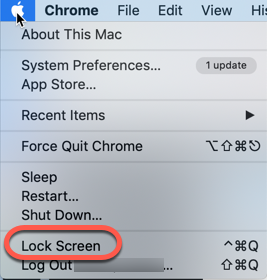
To lock a Macintosh computer

  • Press the Control – Command – Q keys, or
  • In the upper left corner click the Apple logo and select Lock Screen
To lock a Windows computer

In Windows, when you press the Windows-L key combination the login window appears

Tags:

MacOSX
Author

Laszlo Pinter

Follow Me
Other Articles
Previous

Microsoft Azure – Storage – Part 5 – Delete blobs with a .NET application

Next

Save an image in the Xcode iPhone simulator

No Comment! Be the first one.

Leave a Reply Cancel reply

Your email address will not be published. Required fields are marked *

Search

Last Changes

  • How to create a bootable USB drive to install Windows 11 October 11, 2026
  • Nautilus U618 exercise bike magnetic brake adjustment October 11, 2026
  • Health October 11, 2026
  • Limit the battery charge level on MSI laptops October 7, 2026
  • Software and Hardware October 7, 2026

Tags

.NET .NETcore 3Dprinting ASP.NET Core AutodeskInventor AWS C# Chef cloud DevOps Docker EntityFramework Git Go iOS iPad iPhone iPod Java Kubernetes Linux MacOSX MSSQL MVC MySql Node.js Packer PowerShell Python RDS RightScale Ruby security Splunk TeamCity Terraform TestKitchen Tomcat Ubuntu Vagrant VirtualBox VisualStudio Windows WordPress Xcode

Recent Comments

  • Laszlo Pinter on Turn off the built in touchpad when a mouse is attached
  • Kenneth Bush on Turn off the built in touchpad when a mouse is attached
  • Zengei László on MyHeritage családfa exportálása és küldése emailben
  • Raúl Castillo on DynDns update error
  • MICHAEL on Windows Media Player 12 cannot find the album information

–

  • Log in
  • Entries feed
  • Comments feed
  • WordPress.org
Copyright 2026 — Pinter Computing. All rights reserved.