To pass secrets, configuration values to Azure Container Apps we can use the Azure CLI or the Azure Portal.
To pass an environment variable value to toe Azure Container App using the Azure CLI execute the command in a terminal
az containerapp update --name <app-name> --resource-group <rg> \
  --set-env-vars NODE_OPTIONS="--max-old-space-size=4096"
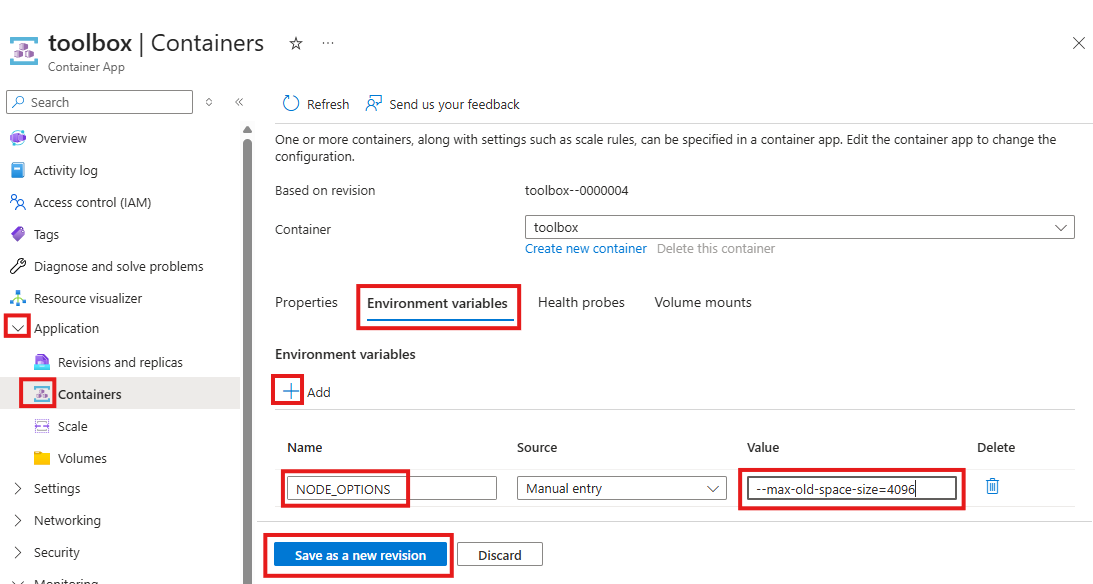
To use the Azure Portal web interface
- Log into the Azure Portal at https://portal.azure.com
- On the Container Apps page select the application
- In the Application, Containers, page open the Environment variables tab and add a new environment variable. Click the Save as a new revision button